Knowledge base
Everything you need to know about Nanos.
Answers to the questions we hear most often — from your first login to a rejected ad. If something’s missing here, our team is happy to help.
Ad rejected? The most common reasons.
Drawn from thousands of Google and Meta rejections — ranked by frequency. Full details in the “Ad rejected” section.
01Basics 5
What is Nanos, and what does the “AI” actually do?
Nanos is a tool for running online advertising — the paid ads at the very top of Google's search results and in the social networks Facebook, Instagram and LinkedIn. You enter a few basics (what you want to advertise, which region, what budget), and Nanos builds the ads from that and runs them on the platforms. You don't need any prior marketing knowledge.
What makes it special is the artificial intelligence (AI) working behind the scenes. Think of it as an invisible employee that reviews your campaign every day and fine-tunes it. Specifically it does three things:
- It spends your budget smartly. If the ads are doing better on Google than on Facebook right now, it automatically moves more money there — and vice versa. Freshly, every day.
- It tests the different ads you created against each other and makes sure the best-performing ones get the largest share of that network's daily budget.
- It finds the right search terms on Google for your ad to appear on.
The ad copy is suggested to you automatically, based on the content of your website. These suggestions are a good starting point — but as with any AI, it's worth reading them over before launch so they really fit you.
You tell Nanos what you want to advertise. The how — steering, budget, optimisation — is the AI's job.
What happens between creating a campaign and it going live?
A campaign is simply an advertising order: an ad that runs for a set period with a set budget. From creation to actually going live it passes through three steps:
- You create it and publish it.
- We check the campaign first. Before we forward it to the networks, we make sure that policies you might not even be aware of are applied correctly too — for example the special rules for job ads or real-estate ads.
- Google and Meta review the ad. Every ad is checked by the platforms before it's shown publicly — whether the text, image and target page meet the advertising rules. This review usually takes up to 48 hours. (Meta is the company behind Facebook and Instagram — when we say “Meta”, we mean both.)
- The campaign goes “active”. From now on the ads run and the AI starts optimising.
Two things that often cause confusion:
- Campaigns start at around 6 a.m. on the chosen day by default — not the moment you click “Publish”.
- Google takes longer than Facebook. While Facebook often delivers reach on day one, Google eases in over a few days. If little happens on Google at the start, that's completely normal and not a fault.
Which platforms can I advertise on?
Through Nanos you reach the four big advertising channels. Briefly, what each one is:
- Google Ads — the ads that appear at the very top of Google search when someone searches for something. Through Nanos you also get a slimmed-down version of the Display Network (banner ads on other websites), which runs alongside the search ads.
- Facebook and Instagram — both belong to Meta and are run together.
- LinkedIn — the professional network, mainly for ads aimed at a business audience. Currently in a test phase with limited features (see its own question).
Which of these channels are enabled in your account depends on your setup. If you're unsure, just check with support.
How does LinkedIn work in Nanos?
LinkedIn is still in a test phase (beta) in Nanos — meaning it already works, but with fewer options than Google and Meta. Two things to know:
- LinkedIn can only be selected on its own — not in a campaign together with Google or Facebook. If you want to advertise on LinkedIn, that's a separate campaign of its own.
- The numbers (clicks, reach) only update every 24 hours — so you won't see every change immediately.
If you want to use LinkedIn regularly, we'll set it up together in a short onboarding — much like we once did for Facebook. The prerequisite is that a company ad account, a company page and a so-called Business Manager already exist on the LinkedIn side. If those terms mean nothing to you: no problem, we'll walk through it together in the session.
Can I promote an existing Facebook or Instagram post?
No. You might know the blue “Boost post” button directly in Facebook or Instagram, which pushes an already-published post. That is not possible through Nanos.
Nanos works differently: from your input it creates its own, new ads and runs them as a proper advertising campaign — with budget optimisation, A/B testing and reporting. So an existing post or profile can't simply be “boosted”.
02Access & accounts 7
How do I create a new user / login?
A new login means: a new person should be able to log in to Nanos and work. Here's how to get them set up:
- Write a short email to the support address.
- Give the new person's email address — that will also be their username.
- Say which white label (i.e. which Nanos access of your organisation) the login is for.
We'll then send you back a password to pass on to the person. They can log in with it right away. You can also register several people in one email.
Keeping these credentials safe is your own responsibility, not Nanos's. Store them somewhere secure and avoid passing them around openly by email where you can.
An employee has left — how do I remove their access?
When someone leaves the company, their access should be deactivated so they can no longer log in. Just send us the affected account's email address to the support address and we'll deactivate it.
If that person managed campaigns: those don't disappear, but they'll then be tied to an inactive user. If you like, we'll reassign them to someone else beforehand so someone keeps an eye on them. Just tell us who. Your superusers (full-access accounts) can see the campaigns regardless.
I can't log in — what's usually the cause?
In the vast majority of cases it's one of these three small things — just work through them in order:
- Capitalisation in the email. Nanos treats the login address as case-sensitive. Max.Mustermann@… and max.mustermann@… are two different addresses to the system. Tip: type your address entirely in lowercase.
- The password is wrong. Drop us a line — we'll reset it and send a new one. Don't guess too many times, that can temporarily lock the account.
- The browser is auto-translating the page. Sounds harmless, but it's one of the most common causes of odd behaviour. There's a separate question on this further down.
Login asks me for an SMS code — what's that?
That's so-called two-factor login (also called MFA) — an extra layer of security. On top of the password, when logging in on a new or unknown device, a numeric code is sent by SMS to a phone number on file. Only once you enter that code do you get in. This protects your account even if someone knows your password.
That phone number is firmly tied to the account. If you no longer have access to the number (e.g. because a colleague originally set the account up), write to us:
- We can send you an email to reset the password.
- For security reasons we can't simply swap out the stored phone number. If needed, we'll create a fresh account for you with a different email address, which you then link to your own number.
The cursor jumps, entries don't save, sometimes “404” appears — what's going on?
If Nanos feels “possessed” — the text cursor jumps to the end while typing, your entries vanish again, the “Overview” tab is missing, or a “404” error page suddenly appears — it's almost always down to one cause: your browser is auto-translating the Nanos page (Google Chrome in particular likes to do this on its own).
This automatic translation rebuilds the page in the background and scrambles the input fields. It's not a Nanos fault — and it's quickly fixed:
- Turn off automatic translation for the Nanos site. In Chrome a small translate icon usually appears at the top right; click “Never translate this site” there.
- Better still, set the language directly in Nanos settings to your language — then you don't need the browser translation at all.
In our experience, around 95 % of all “the tool is glitching” reports resolve exactly this way.
Can I use one email address across two white labels?
Short answer: no. To explain — a white label is your own branded version of Nanos (e.g. under your own web address). Some organisations run several of them.
But an email address can only ever belong to one white label — the system uses it as a unique identifier. If the same person needs access to a second white label, we need a second email address for that.
That second address doesn't even have to be a real inbox — it just serves as a second, unique login. So you can use a slight variation, for example.
Can I give someone read-only access (view but not edit)?
Currently this isn't possible. The highest level of access in Nanos is called superuser — this role can see all campaigns in the white label. But a superuser always has edit rights too, so they can change things.
A pure “look but don't touch” role doesn't exist at the moment. So if you want to give, say, your management a view without anything being changed by accident, that unfortunately can't be reflected right now — but we're happy to note the request.
03Creating & launching 7
My campaign isn't starting — what can I check?
Don't worry — it's usually one of three harmless reasons. Just work through them in order:
- Is the campaign less than 48 hours old? Then it's probably still in review. Every ad is checked by Google and Meta before it runs publicly — that takes up to 48 hours. During this time, “not starting yet” is completely normal.
- Did you get an error email? If something goes wrong at publishing, our system automatically emails you the exact reason. Check the spam folder too — these emails like to land there.
- Is the ad account suspended? If the Facebook or Google ad account linked to your campaign is restricted (e.g. due to a payment problem), nothing can be delivered — no matter how correct the campaign is.
None of these fit? Then send us the full name of the campaign (exactly as it appears in your overview), and we'll look into it for you.
What does the status “partially ready” mean?
Every campaign has a status — a small label telling you what state it's in (e.g. “active”, “in review”, “ended”). “Partially ready” means: part of your campaign is already running, another part isn't quite there yet.
This happens because your campaign often runs on several platforms at once (e.g. Google + Facebook). If one platform has cleared review and the other hasn't, the campaign simply shows “partially ready”. Usually it's just the first numbers that are missing, which are expected on the start morning.
As long as the status is not “with problems” and you haven't received an error email, everything's fine. Just be a little patient — it sorts itself out.
What does the status “with problems” mean?
This status means one of your ads was rejected by Facebook/Instagram or Google — the platform won't run it in this form. We usually detect this automatically and send you a notification with the specific reason.
Ad accounts and handling rejections sit on your organisation's side. So the best first step is to bring in whoever has access to the Google/Meta ad manager (Business Manager) — they can look at the account directly. We're of course happy to help if you ask, but the account and its rejections are yours to manage.
For the most common reasons and how to fix them, we've put together a detailed rundown in the Ad rejected section.
Can I move the start date earlier or launch a campaign immediately?
No. Once a campaign is published, its dates — including the start date — can no longer be changed. This is true whether or not the AI's automatic budget distribution is switched on.
The reason: at launch the AI sets up a complete, coordinated configuration directly inside the ad accounts. It can't be shifted afterwards without throwing everything off.
If you want to start earlier, the only clean route is to stop the campaign and create a new one (duplicate) with the start date you want.
What's the minimum budget a campaign should have?
As a rule of thumb we recommend around €150 per month per platform. So if a campaign runs for a month on Google and Facebook, that's roughly €300 in total.
Why this threshold? Online advertising works like an auction: behind the scenes, a bid is placed for every click. If your budget is very small, you can only rarely join the bidding — with tiny daily budgets, one or two clicks a day is often the ceiling. The AI then simply lacks the room to try out different audiences and search terms and find the best ones.
Very low bids also send an unfavourable signal: you're indirectly telling the platforms you're fine with lower-quality clicks too. Better a few campaigns with enough budget than many with too little.
Why can't I set the duration all the way to the date I want?
The maximum possible duration of a campaign is calculated from your budget divided by the number of platforms. Put differently: the budget has to last the whole time.
Crucially, our recommendation of ~€150/month applies per platform. An example: with €150 you get about a month on one platform. Choose two platforms and the same budget splits — it then only lasts about half a month. That's why the system sometimes “stops” you before your desired date: otherwise the money wouldn't be enough.
If you picked only one platform and the campaign still ends much earlier than expected, let us know — that could genuinely be a bug we'll look into.
The end date jumps to the next day — is that a bug?
No, that's not a bug, even though it looks confusing. The cause is the daylight-saving changeover (the switch between winter and summer time). If your campaign's period includes exactly the changeover day, the end technically shifts by one hour — and so the system shows the following day as the end date.
Nothing changes for the actual delivery of your ads: the system calculates correctly, and your campaign runs for as long as planned. So you can confirm the ad as is.
04Budget & duration 5
Can I change the budget of a running campaign?
No. The budget of a running campaign can't be changed — and that's the case whether or not the AI's automatic budget distribution is switched on. At launch the system builds a finely tuned setup that can't be re-pointed at a different budget afterwards.
If the budget (or the start/end dates) was entered incorrectly, there's only one way forward: stop the campaign and create a new one with the correct values. That counts as a separate, new campaign and is therefore billed again.
This is why we show you the budget and the start and end dates clearly before publishing — please check them there carefully. Once a campaign is live, those figures are final.
How do I extend a campaign?
There's no dedicated “extend” feature anymore. To keep a campaign running, you simply duplicate it and choose the new duration and, if needed, a new budget in the copy.
That sounds more cumbersome than it is — and it has an advantage: the copy inherits all the AI's learning so far. So your “extended” campaign continues at full optimisation level, rather than starting over.
Don't confuse this with “topping up the budget”: if you used to add budget to a running campaign, it was simply added on, with no recalculation. Today the clean way is always to duplicate.
Why wasn't the full budget spent (underspend)?
“Underspend” simply means: at the end there was leftover budget that wasn't spent. There's usually a very deliberate reason for this.
To make sure a campaign never spends more than booked, the system carefully brakes just before the end — with a safety margin of about €10. Better a few euros short than a cent too much. Across many campaigns this lands very precisely; on a single campaign a small remainder can stand out.
So an underspend of roughly 1–2 % is completely normal. If the remainder is noticeably larger, it's usually one of these causes:
- The duration was too short to spend the money sensibly.
- The audience or target area is too small — there simply aren't enough people to reach.
- The offer is a very narrow niche that hardly anyone searches for.
- The budget was set too low.
Our recommendation: always leave automatic budget distribution switched on — that uses the money best and most fully.
My campaign was paused automatically — why?
This is a protective feature. The system pauses a campaign on its own if there's a risk it might spend more than booked (an “overspend”).
How does that happen? Google and Meta report spending to us with a slight delay. Combined with ongoing optimisation, a campaign can briefly spend a little too fast — say €151 instead of the booked €150. That's exactly what the automatic pause prevents.
Thanks to the ~€10 safety margin, it's only a brief brake: the campaign usually restarts automatically the following night. So you don't need to do anything.
Do test or correction campaigns get charged? For partners
Good to know: as soon as a campaign spends money, it's billed — even if it was meant as a test or a correction. The reason: right at launch the AI builds its full setup directly inside the ad accounts. So a campaign that has gone live and used budget counts as a real campaign.
If you genuinely just want to test or correct something, cancel the campaign before a single cent is spent — those campaigns are never charged. But once it's live and spending money, we have to invoice it.
05Ad rejected 13
Why do ads get rejected at all — and what does that mean for me?
Before an ad runs publicly, Google and Meta check it — at first not by humans but automatically, by their own AI. This review AI checks the text, image and the linked website to see whether everything meets the (very extensive) advertising rules.
Important to understand: this review AI doesn't read like a human. It recognises patterns and, when in doubt, would rather reject too much than too little. That's why completely harmless ads regularly get rejected too — often with no clearly identifiable reason. This comes from the platforms, not from Nanos, and unfortunately we have no direct influence over it.
The good news: in the vast majority of cases a rejection can be resolved. Three ground rules almost always help:
- Don't panic-edit over and over. Every change sends the ad back into review. If the platform keeps rejecting it, the risk rises that it suspends the entire ad account — and that's far more unpleasant than a single rejected ad.
- For stubborn rejections, swap the image, not just the text. Very often the cause is in the visual, not the words.
- An appeal can help — especially if a real human then reviews the case. Sometimes a wrong rejection is even reversed on its own.
On the cards below you'll find the most common specific rejection reasons, each with a simple guide on what to do.
“Landing page unreachable / not crawlable” (error 404, 503) — what to do?
First, two terms so the message makes sense:
- The landing page is the website people land on when they click your ad — the target page.
- “Crawling” means: Google and Meta automatically send out a small program that visits and reads this page to check whether it's OK. If that fails, the ad is rejected — the platform doesn't want to send anyone to a broken page.
The error numbers reveal the problem: 404 means “page not found” (e.g. a typo in the link, or the page was deleted), 503 means “server currently unreachable”.
Here's how to tackle it:
- Open the link yourself in your browser. Does the page load normally? If not, that's exactly the problem — the address is wrong or the page is down.
- Check that it's the final address without a redirect (see the separate question on “redirect”).
- The page may be technically blocking the review program. Usually only the website's operator (or their tech/agency) can change that.
Sure the page is fine and the rejection is wrong? Then let us know — we can request another review from the platform.
“Redirect / destination mismatch” — what does that mean?
First the term: a redirect is when you enter one address but the browser automatically sends you to a different address. Example: you type company.com/promo but actually land on company.com/summer-special-2026. Short links (like bit.ly) are a typical case.
On Google, such redirects are not allowed in ads. Google only accepts the final destination address — the page people actually end up on. If you enter a redirecting address, Google rejects it.
The fix: open the link yourself in your browser, look at which address ends up in the address bar at the top — and enter exactly that final address into the campaign. By the way, our system already warns you at input time when it detects a redirect.
The link is correct but the ad is still rejected (error 414 / long URL)
This is a tricky one, because your link is objectively correct. The reason lies deeper: when redirecting, Facebook automatically appends a long chain of technical extra information to the address (this is used for reporting). So company.com becomes a very long address.
Some websites are technically configured to reject such long addresses — the server then responds with an error (often “414”) and the ad can't be delivered. To you the link looks correct, but to the target page's server it's too long.
Unfortunately this can't be fixed in Nanos, only on the target server: the website's operator (or their tech) has to adjust the server setting so it accepts longer addresses. If you need a guide for this, we're happy to point you to where it's explained.
“Political / social issues” — even though my ad isn't political at all?
This is by far the most common rejection reason on Facebook/Instagram — and the most frustrating, because it constantly hits completely harmless ads. The reason: Meta classifies an ad as “political” the moment it (or the linked page) mentions a political figure or an official — and Meta explicitly counts a mayor among these. Social topics like elections or environmental protection are enough too.
That's why things get rejected that aren't meant politically at all: a town festival, an open day, a museum event, a mayor's welcome note. The review AI only sees the name or the topic — not the harmless context.
You have two routes:
- Remove the political reference (the easier route). Take the mention of the political figure out of both text AND image — both have to be clean, not just the text. Note: if the name also appears on the linked website, it can still be rejected.
- Get authorised (the more involved route). If the reference has to stay, Meta requires an official approval process: verify the ad account, add a so-called disclaimer on the Facebook/Instagram page (a small “who's paying for this ad” note) and link it to the ad account. Then let us know and we'll set the campaign up accordingly.
Very important: don't keep re-publishing the ad without removing the reference or getting authorised. Without those steps it will be rejected again — and repeated rejections can cause your entire ad account to be suspended.
A job ad is rejected on Facebook — what does the platform want from me?
Facebook/Meta reviews job ads especially strictly, because a lot of fraud happens through job advertising. The review AI therefore sounds the alarm as soon as an ad contains too little concrete information or sounds too good — then it's quickly, wrongly flagged as “scam” and rejected.
Here's how to reliably get through review:
- State specifically what it's about. The exact job title (e.g. “Electrician (m/f/d)”) absolutely belongs in the ad text — not just the image. The review AI reads the text more reliably than the image.
- Describe the role briefly and factually. The clearer, the better.
- Avoid exaggerations and vague promises. Phrases like “dream job”, “above-average pay” or specific salary claims are typical rejection triggers.
Be as concrete and matter-of-fact as possible. That resolves the vast majority of job rejections. There's still never a 100 % guarantee with Meta — the platform stays unpredictable.
“Phone number in ad text” — why won't Google allow this?
On Google ads, a phone number in the text simply isn't allowed — neither in the headline nor the description. That's a firm Google rule, not a Nanos fault.
But there's a better solution that Google explicitly offers: the call extension. This is an extra field next to your ad where the phone number appears as a clickable call button — on mobile, users can call directly from it. It even looks more professional than a number in the middle of the text.
We can enable this call extension in your account — just let us know.
An event-ticket campaign is rejected — what's missing?
As soon as your ad sells admission or tickets, Google requires a special proof — a kind of official approval (called a “certificate” in the system). It's a safeguard against dodgy ticket sellers. Without this approval, Google rejects the ad.
The route there: you (or the event organiser) fill in a form at Google and wait until approval is granted. This can take a few days. Only then does the ticket campaign run.
If you need help with the form or get stuck, let us know — we'll guide you through the process.
“Certificate required” — even though I'm just hiring?
Some topics and industries may only be advertised on Google with a special approval (a “certificate”) — for example healthcare and pharmacies, or certain protected brand names.
The catch that surprises many: Google looks not only at your ad but also at the content of the linked website. An example: you're “only” advertising for staff for a pharmacy — but because the linked page lists health services, the healthcare policy kicks in and the ad is rejected, even though it's really about a job.
What you can do:
- An appeal can be worth it, especially with a short explanation of what it's really about.
- Fundamentally, though, the advertising company has to apply for the certificate — that's a process at Google we can't go through on your behalf.
“Media not wide enough” — my image or video is rejected
This message is one of the easiest to fix. “Media” means your image or video. Instagram requires it to be at least 500 pixels wide (pixels are the unit for image size on screen). If your asset is narrower, the ad won't run on Instagram — it would otherwise look pixelated and blurry.
The fix: upload a larger, higher-resolution image or video. Small logos, screenshots or mini-images copied from the web are the typical stumbling block. More on image and video formats in the Images & video section.
Instagram says “subscribe or allow personalised ads”
This isn't a rejection of your ad in the real sense, and not a Nanos fault, but a setting in your client's Instagram or Facebook account. Background: in Europe, Meta introduced a choice where users either allow personalised ads or take out a paid ad-free subscription. If the linked account is set to “less personalised ads”, no advertising can run through it.
So for your campaign to run, the linked account must allow the full ads experience.
Check the linked Instagram account in particular. Between Facebook and Instagram, the stricter setting always applies. Often Facebook is fine, but the Instagram account is set to “less personalised ads” — which then blocks everything. Switch it back and the campaign runs again.
The path in the Meta account: click the profile picture → “Settings & privacy” → “Settings” → “Account Centre” → “Ad preferences” → “Ad experience” → choose and confirm the full (personalised) option there.
“No payment method” / account restricted — the ads won't run
For Google or Meta to run your ads, they need a valid payment method in the ad account — usually a credit card. If something's wrong with it (card expired, blocked, or a failed payment), the platform restricts the account and nothing is delivered anymore, no matter how good the campaign is.
Here's how to fix it:
- In the affected ad account, open the payment settings and add a valid payment method.
- Once the account is active again, let us know — then we'll get your campaigns running again.
A common special case: if the advertising platform charges a card several similar amounts in a short time, some banks consider this suspicious and automatically block the card. A quick call to the bank then helps.
Our entire ad account was suspended — what now?
An account suspension is the more serious case — not just a single ad is affected, but the entire ad account is halted. Please act deliberately, not hastily:
- Don't change anything further and don't re-publish rejected ads — that can make things worse.
- In your ad account, look at the “Policy issues” and “Appeal history” sections. Take a screenshot of them and send it to us — that helps us find the cause.
- Contact support. Often one specific campaign is the trigger. To get the account reinstated, it may have to be removed.
An important note on expectations: an appeal (review) can help but takes time. There's no “fast-forward” button with Google and Meta — some patience is needed here. We'll guide you through the process.
06Connecting accounts 4
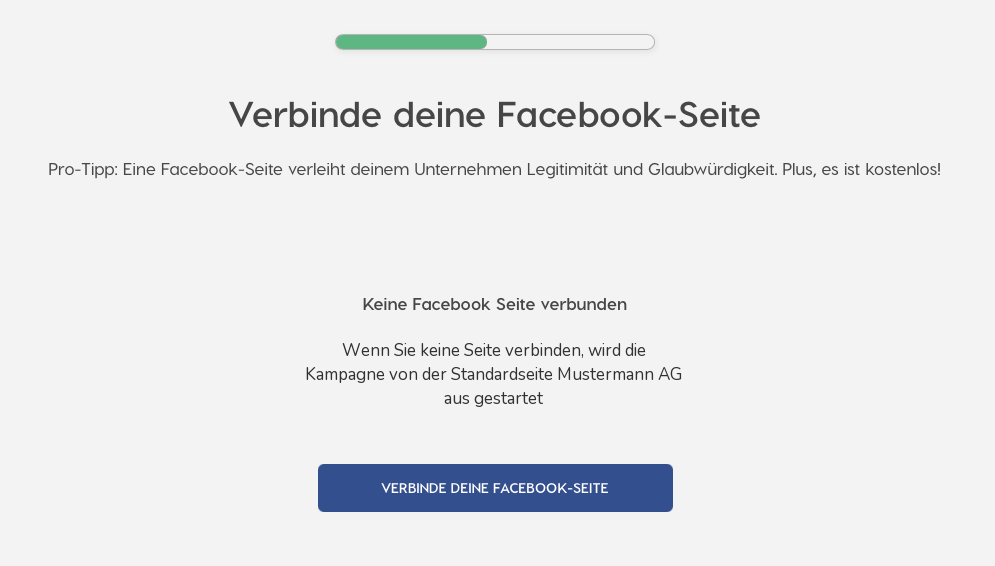
How do I connect a Facebook page to a campaign?
For Nanos to run ads on Facebook/Instagram on your own or your client's behalf, the relevant Facebook page (yours or your client's) must be connected to your ad account. Before you start, quickly the terms:
- A Facebook page is a company's public presence on Facebook.
- The Business Manager (today also “business settings” or “business portfolio”) is the central place where a company bundles its pages and ad accounts.
For the connection to work, two things must be true:
- The page and the ad account are in the same Business Manager.
- The person making the connection is an administrator of that Business Manager (ideally full admin rights, not just basic access to the page).
If you get the error “Something went wrong”, it almost always means: the linking user isn't part of the Business Manager that owns the page. Then the permissions there need adjusting.
I only want to connect an Instagram account — is that possible without Facebook?
No. Even if you only want to advertise on Instagram, you need a Facebook page for it. The reason lies with Meta itself: Instagram and Facebook are technically closely linked, and advertising on Instagram is always steered through an associated Facebook page — never directly through the Instagram profile alone.
So an Instagram account can't be connected directly in Nanos. Your client always needs a Facebook page for the Instagram ads to run through. It's a one-time setup and a non-issue afterwards.
The client's page doesn't appear in the list — why?
Usually the page isn't yet “hooked into” the right place. For it to appear for selection in Nanos, it must sit in the same Business Manager (business portfolio) that your ad account runs through — and your access must be authorised for it.
Here's how to check:
- Open Meta Business Suite (the management interface for Facebook/Instagram).
- Verify whether the client's page is added to the right business portfolio.
- If it isn't there yet, it needs to be added and your access granted.
Only when both are true does the page appear in Nanos. If it's stuck, look at it together with us — this is one of the cases we solve fastest in a quick exchange.
After a password change, stats stopped updating
For Nanos to pull your numbers from Facebook, the system stores an access token — a technical “key” that lets Nanos access your Facebook account. If you change your Facebook account password, this key becomes invalid and we can no longer load current numbers.
This is fixed in a minute:
- Create a new campaign draft in Nanos (you don't have to publish it).
- Connect Facebook again inside it.
This automatically refreshes the key on our side, and the stats update again.
07Reporting & status 6
The status is wrong (e.g. “active” though the campaign has ended). Is that a problem?
Short answer: no, as a rule not. The status (the label “active”, “paused”, “ended”) updates with some delay — sometimes up to two days. That's because for the correct status we have to wait on data from Google and Meta, which doesn't come in real time. On the start morning in particular, the status often lags a little.
A campaign that has genuinely ended will not restart on its own — even if it briefly still shows “active”. So it doesn't cost you anything. If you want to be completely sure, let us know and we'll set the status to “ended” manually.
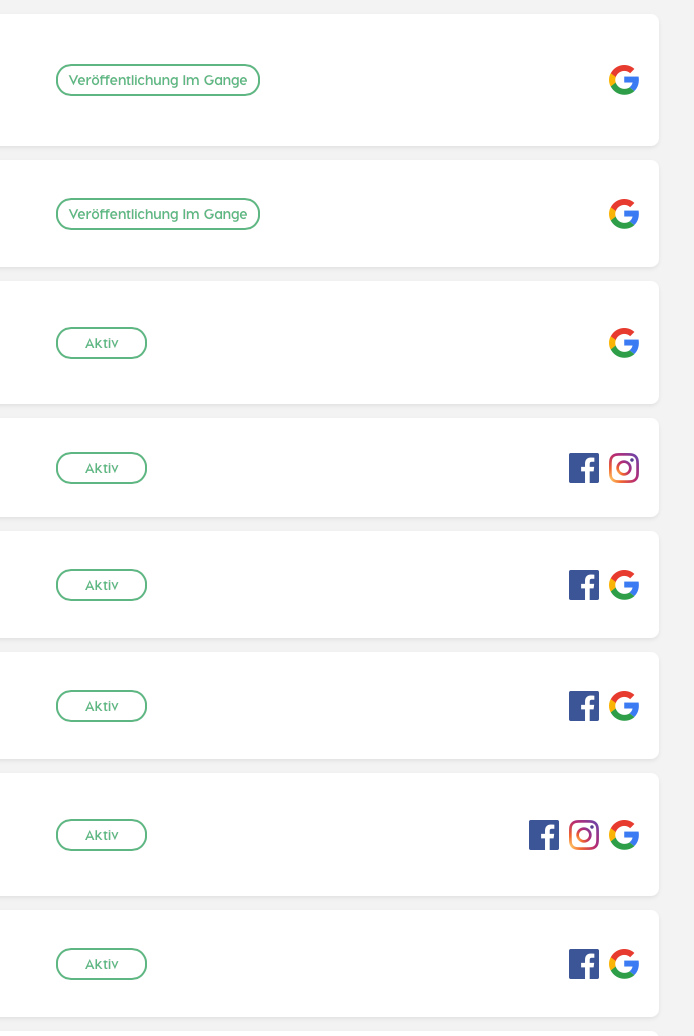
I cancelled a campaign — but it keeps running and spending budget
In the vast majority of cases this is just the delayed status display from above — the campaign looks active but no longer is. If you want to be sure, wait a day and check the amount actually spent.
But if a campaign really keeps spending budget after being cancelled, that's one for us: send the full campaign name and we'll cancel it cleanly server-side and find the cause.
A known special case: campaigns created in an ad account that has since been decoupled (this happens e.g. after an account switch) can no longer be controlled from the normal interface. Then we have to stop the campaign from our side — just let us know.
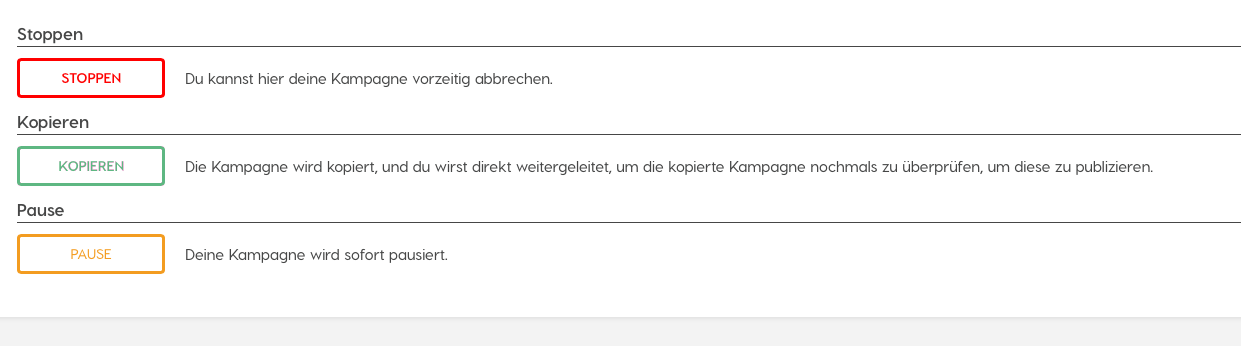
You can pause, stop and permanently cancel a campaign yourself in the “Control” tab:
The numbers in the dashboard aren't updating
The dashboard is your overview page with all the numbers (clicks, reach, etc.). These numbers come from Google and Meta — not in real time, but with some delay. So it's normal that not something changes every minute.
But if nothing has moved at all after several hours, an update can be “stuck” on our end. That's easy to nudge: just tell us which campaign it's about and we'll force a fresh update from our side.
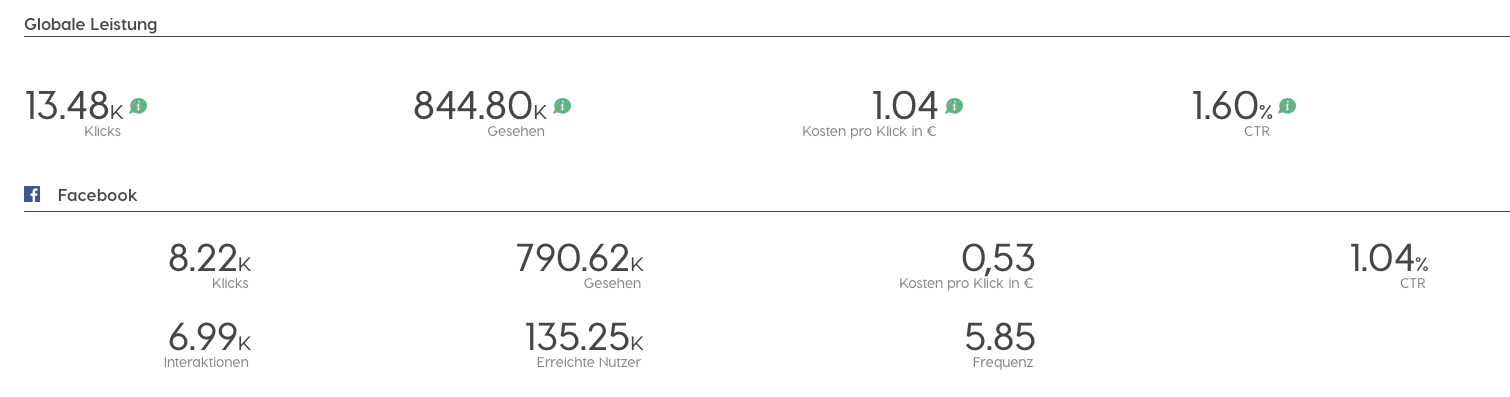
Why do I only see regions, not individual cities, for Facebook?
This is down to Facebook itself, not Nanos. For Germany, Facebook doesn't provide us with reporting at city level, only more coarsely at region level. Google provides that finer data, Facebook doesn't.
Crucially: this only affects the reporting, not the delivery. Your ads are still delivered precisely to the locations you chose — you just can't see afterwards, on Facebook, in such fine detail exactly where the clicks came from. Unfortunately we can't change that.
How do I get a report as a PDF — and in which language?
A report is the results summary of your campaign that you can show a client, for example. Reports are now conveniently sent by email rather than downloaded directly from the interface.
On language: the report automatically comes in the language set on your user account. If your account is on English, the report is English too. If you'd like it in German, just switch the language to German in your user's Nanos settings — then the next reports come in German.
Nanos's click numbers don't exactly match Google/Meta
Slight differences between the numbers are normal and technical in nature — a hundred-per-cent match isn't even possible.
The reason: some clicks can't be attributed cleanly. For example, when a user isn't logged in to Google, has cleared their cookies, or uses several devices. Different systems count such cases slightly differently. Nanos relies on the numbers Google and Meta report to us — small discrepancies between the views are entirely normal and no cause for concern.
08Images & video 5
What's the minimum size for an image?
For Instagram, images must be at least 500 pixels wide (pixels = the unit for image size; a normal phone photo is several thousand pixels wide, so it's easily large enough). A video's thumbnail counts here too.
Assets that are too small won't run on Instagram because they'd look pixelated. Typical stumbling blocks are tiny logos, small screenshots or mini-images copied from the internet. When in doubt, use a larger, high-resolution original.
How do I upload a vertical video / reel (9:16)?
Quick context: 9:16 is the vertical format that fills the whole phone screen — the way Instagram Reels and Stories look. Alongside are the landscape or square videos for the normal feeds.
Here's how to upload both correctly:
- First upload your main video (ideally in 1:1 or 16:9 format).
- Only then does a second upload button appear for the vertical video (9:16). That one is then shown only in Stories and Reels.
If you upload only one video, it's used everywhere — including in Stories, where it may then look cropped. So for a clean appearance it's worth adding the matching 9:16 video. If you upload the same video for both, it runs the same everywhere.
Can I run a carousel (several swipeable images)?
Yes. A carousel is an ad made of several images that users can swipe through sideways — great for showing, say, several products or steps.
If the carousel format doesn't appear in your white label yet, it simply isn't enabled. Just let us know and we'll switch it on for you.
In the preview my video only plays partially — is it broken?
No, all is fine. What you see in the Nanos interface is only a preview — a shortened view so you can recognise the asset. The full video plays normally at full length in the actual, delivered ad.
So you can rely on it: even if the preview cuts off after, say, 5 seconds, users will later see the complete video.
My GIF isn't shown animated (it doesn't move)
A GIF is a short, looping animated image. If you upload it via the normal image upload, the system treats it like a photo — and therefore shows only the first still frame, without motion.
The fix is simple: if you need the animation, upload the file not as an image but as a video. Then it plays properly.
09Reach & performance 4
My campaign is getting very few clicks — what could be causing it?
Low reach is frustrating but almost always has an explainable cause — often several at once. The most common:
- The budget is too small. Online advertising is an auction; with very small daily budgets you rarely get a turn. One or two clicks a day is then often the ceiling.
- The target area is too small or sparsely populated. Where few people live, there are few potential clicks.
- The offer is a narrow niche. Very specialised products are hardly searched for — so demand is simply missing.
- The landing page is weak. If the target page has barely any text or content, the AI finds little to work with to steer the ads well.
- Competing campaigns of your own. If two campaigns run for the same client on the same terms, they bid against each other (see the next question).
What helps: keep automatic budget distribution on, set a realistic budget — and give Google a few days to ramp up before you judge.
Should I run several campaigns for one client on the same terms?
Better not — it usually does more harm than good. The reason lies in the auction that online advertising runs on: a bid is placed for every ad slot. If two of your own campaigns run on the same audience or the same search terms, they bid against each other — so you compete with yourself and push up your own click prices.
There's no platform penalty for it, but the result is wasted budget. So avoid overlapping campaigns for the same client. If you want to advertise several offers, separate them cleanly by topic or region.
Can I change settings directly in the Meta or Google ad account?
Please don't — tempting as it is. Important to understand: at the launch of your campaign, the AI builds a complete, finely coordinated setup directly inside the Google/Meta ad accounts. If you change something by hand there (locations, texts, budgets, business profiles), Nanos doesn't recognise it — and the two systems fall out of sync.
The consequences range from wrong statistics and error messages all the way to, in the worst case, other campaigns in the same account being affected.
The right way: if you want to change something on a running campaign — such as adding an extra location — just write to us. We'll take the change into the system cleanly, so nothing gets tangled up.
Can I exclude certain audiences (e.g. competitors or my own staff)?
To a limited extent, yes — but the practical benefit is usually smaller than you'd think.
- On Facebook/Instagram, exclusion groups can be built, e.g. based on interactions or email lists. Due to many users' privacy settings, though, these often can't be reached at all.
- On Google, you can exclude individual IP addresses from delivery. But that won't stop your staff from seeing the ad outside the office (e.g. on their phone).
Our honest advice: don't put too much effort into this — the effect is usually small in practice, and we've yet to see a case where a client was seriously harmed by it. But if a client has a specific concern, we're happy to look at it together.
10For partners 6
What's the fastest way to get support? For partners
Two simple habits make the biggest difference:
- Always write to the support address, not to individual colleagues personally. The support address is watched by several people — so you get a fast answer even when someone is on holiday or in a meeting.
- Include the full campaign name in every ticket, exactly as it appears in your dashboard. That's the single biggest speed-up: without the exact name we first have to ask back or search at length before we can help.
At the bottom of this page you'll find a short checklist of what belongs in a good ticket.
Which additional features can be enabled for our white label? For partners
Nanos offers more than is visible in the standard setup. On request, we can enable, among others:
- LinkedIn (beta) — after a short onboarding.
- Conversion campaigns — campaigns that optimise for measurable actions (e.g. a purchase or enquiry). This needs a so-called pixel or conversion action on the target page.
- Call extension for Google — the clickable call button next to the ad.
- Carousel for Instagram — several swipeable images.
- More detailed product categories — per a list you provide.
- Separate click-through rate (CTR) for search and image ads.
- Sharing campaigns with colleagues and an integrated, Canva-style editor for designing assets.
Just tell us what you need — we'll enable it and let you know once it's live.
Please note: some settings (such as conversions or extended click tracking) then apply to all users of your white label, not just a single client.
Which account do campaigns run in — ours or the client's? For partners
By default, all campaigns are published in your white label's central ad account. That's the simplest case: you don't have to worry about individual client accounts.
There's also a feature that lets the user choose, when creating a campaign, which account to publish through — for example the client's own ad account. But this feature isn't active in every setup. If you need it, we'll enable it.
If a client connects their own account, their Facebook page and ad account must sit under their own Business Manager, and your system access must be authorised there — otherwise delivery won't work.
How should we name campaigns? For partners
The most important rule for smooth support: always give us the full campaign name (exactly as in the dashboard). Short labels or “yesterday's campaign” cost everyone time — with the exact name we find it instantly.
Two further recommendations:
- Avoid identical or duplicate campaign names. If several campaigns show up with the same name, troubleshooting becomes noticeably harder for all of us.
- Internal prefixes (e.g. a cost centre at the start of each name) can generally be automated. That's a small development we're happy to quote for.
How is billing handled, and what about cancelled campaigns? For partners
Billing is based on the net budget — the amount actually spent on the advertising platforms, not the gross amount the client books. Two things are good to know:
- Campaigns you cancel before anything is spent at all aren't charged.
- As soon as a campaign spends money it's billed — test or correction campaigns included (see the Budget section).
For questions about individual invoices, it's best to go through support — we'll forward them to accounting and get back to you.
After connecting our white label, we get an SSL/certificate error For partners
Quick context: an SSL certificate is what enables the little padlock icon and the “https” in the address bar — it provides the encrypted, secure connection. If a certificate error appears after your white label is set up, it's almost always down to a so-called CAA record in your domain's DNS settings.
A CAA record specifies which providers are even allowed to issue SSL certificates for your domain. Some hosts add such a record automatically — and it then unintentionally excludes our certificate provider.
Here's how to fix it: check the CAA records of your (sub)domain. If unsure, we'll send you the exact values you need to add there so our provider is allowed. It's a one-time DNS change, after which it runs permanently.
How to reach us
Write to the support address — it’s watched by several colleagues, so you’ll get an answer faster than through any one person.
For onboarding, new features or trickier topics, we’re happy to jump on a call.
A good ticket in four lines
- The full campaign name (exactly as it appears in your dashboard).
- The affected user email or the white label.
- A screenshot of the error — for technical issues, ideally with the Network tab open.
- What you expected, and what happened instead.